

See a Patient in DocSync – From Start to Finish
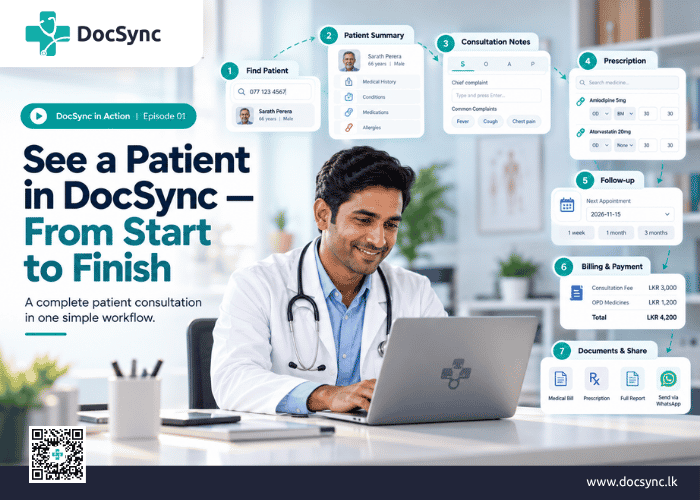
DocSync in Action | Episode 01
Managing a patient consultation shouldn’t mean switching between multiple applications, searching through old records, manually calculating medicine quantities, and preparing bills separately.
We built DocSync to make the entire consultation process simpler, so doctors can spend less time on administrative work and more time caring for patients.
In our first DocSync in Action video, we’ll walk you through a complete patient consultation – from searching for a patient to ending the visit and sharing the documents.
▶ Watch the video: See a Patient in DocSync – Start to Finish
1. Find Your Patient in Seconds
Every consultation begins with finding the right patient.
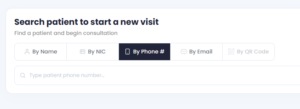
From the DocSync home page, you can search using the patient’s phone number, name, or NIC. Searching by phone number is often the quickest way to find a patient.
Once you’ve found the patient, you can begin the visit and review their health information.
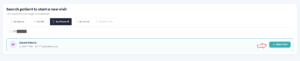
For this demonstration, we’re using Sarath Perera, a 66-year-old patient with an existing medical history.
2. Your Patient’s Medical History, Right Where You Need It
Before beginning the consultation, DocSync displays a Patient Summary containing important clinical information, including previous visits, medical conditions, medications, allergies, and other relevant details.
When you open the consultation, the patient’s profile stays on the left while your visit workspace opens on the right.
This means you can review previous medical information without interrupting your documentation.
3. Record Clinical Notes Without Unnecessary Typing
DocSync follows the familiar SOAP format for consultation notes:
- Subjective: Patient complaints and symptoms.
- Objective: Examination findings and observations.
- Assessment: Primary and secondary diagnoses.
- Plan: Investigations, referrals, and management decisions.
Simply type a complaint or examination finding and press Enter. You can also select from commonly used entries, helping reduce repetitive typing.
Vitals and biometrics can be recorded when required, without making every field mandatory.
Our goal is to make clinical documentation feel like a natural part of the consultation, rather than an additional administrative burden.
4. Write Prescriptions Quickly and Easily
Prescription writing is one of the most frequently performed tasks in Sri Lankan private practice, so we’ve given it particular attention.
With DocSync, you can search for medicines using either their generic or brand names.
Common settings such as frequency and meal instructions can be preconfigured. Simply select the medicine, adjust the instructions if necessary, and enter the duration.
DocSync automatically calculates the required quantity, which the doctor can review and change.
You can also distinguish between medicines dispensed directly from your clinic (OPD) and medicines the patient purchases from an outside pharmacy (PHAR).
Have a prescription you use regularly? Save it as a Favourite and load it again with a single click.
5. Don’t Let Follow-Ups Get Forgotten
A consultation doesn’t always end when the patient leaves the clinic.
For patients with chronic conditions such as diabetes, hypertension, or heart disease, regular follow-ups are an important part of ongoing care.
DocSync allows you to schedule the next appointment using a quick interval or a specific calendar date.
Where WhatsApp reminders are enabled and configured, patients can also receive appointment reminders.
6. Billing and Payments, Without the Extra Work
Once the consultation is complete, DocSync brings your billing information together.
Your consultation fee and frequently used charges can be configured in advance. Additional services can be added when required, and DocSync calculates the total, including applicable OPD medicine charges.
You can also apply fixed or percentage-based discounts.
When you’re ready to finish, choose the workflow that suits your practice:
Collect Payment & End Visit — ideal for doctors managing their own consultations and payments.
Send to Cashier & End Visit — ideal for clinics where an assistant or cashier handles payments.
Whether you’re working independently or with clinic staff, DocSync is designed to adapt to how you practise.
7. Your Documents Are Ready
After completing the visit, DocSync makes the relevant documents available, including medical bills and prescriptions.
You can select the documents you need, print them, or share them with the patient through WhatsApp.
There’s no need to prepare the same information again in a separate application.
The clinical information you’ve already recorded becomes part of the documentation workflow.
More Than Just Completing a Consultation
What you’ve seen is more than a collection of individual features.
It’s a connected workflow designed around how doctors actually practise.
And there’s another important part of the DocSync experience: continuity of care.
Through the connected HealthSync ecosystem, relevant consultation information can also be made available in the patient’s personal HealthSync profile, helping them maintain access to their health records beyond an individual clinic visit.
HealthSync is free for patients to get started.
Because we believe healthcare information should remain useful long after the consultation is over.
Built With Doctors, for Doctors
DocSync is being developed specifically for Sri Lankan doctors, with a focus on making everyday clinical workflows easier while supporting patient privacy, secure medical records, and internationally recognized interoperability standards such as FHIR.
Whether you see a handful of patients each day or manage a busy private practice, our goal is simple:
Less time managing the consultation. More time focusing on the patient.
Want to See DocSync in Action?
Explore DocSync at docsync.lk and discover how we’re building a more connected healthcare experience for Sri Lankan doctors.
Coming next in DocSync in Action: Search for a Patient